alan@alanshires.co.uk
  • Home
  • Voice Demos
    • Animation
    • Anime
    • Commercial
    • Narration
    • Video Games
    • Featured Work
  • Acting Demos
  • About
    • About
    • Resources
    • Testimonials
  • Clients
  • Media
    • Media
    • Press
    • Interviews
    • Reviews
  • Blog
  • Contact

Home Studio

Voiceover Software Press – The Full Story

January 22, 2023 by Alan Shires

Making-editing as easy as AbcVoiceover Artists and Their Software

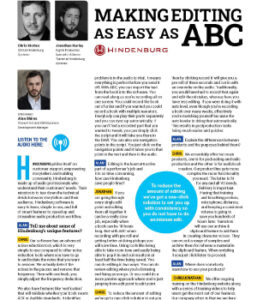
It is no secret that voiceover artists are not a fan of technology. That is not always the case, but it is a regular event. I, for one, love technology, I think it’s fantastic and really enjoy it! With that said, it is no surprise that I interviewed the team over at Hindenburg which is a DAW company that pioneered voiceover software, making recording easier for beginners and professionals.

Why I Love Hindenburg

As a voice actor, I think having the most straightforward solutions available is vital. Between marketing, performing, and all those other plates which desperately need spinning, I need something which isn’t going to absorb all my time. Hindenburg serves that purpose! They host a range of intuitive programs which serve voiceover artists in a range of ways. Now on a personal level, taking the voiceover hat off for a moment, I adore innovative technology. I love new smart functionality like audio command programs turning my lights on, right through to the new camera on the latest iPhone. So, to explain why I love Hindenburg so much, I need to unpack this intuitive element a bit more.

Intuitive Voiceover Software is Smart Tech

I first saw the power of Hindenburg on a webinar where they showed me something which changed everything! There are a few things so let us go through them. Hindenburg Narrator has a function that will automatically upload a script to the DAW so artists can read the script whilst following their audio bar in the DAW recording. But wait! It gets better… as a voiceover artist/voice actor, stopping and starting is so annoying! So, Narrator has taken this into account. Let’s use an example; say I record for a solid hour, and I have made three mistakes, Hindenburg allows me to make a note of where the mistake is, and I can simply click on the script where the mistake was. It intuitively will take me to that exact location in the audio. Voiceover artists/voice actors need not ever worry about going through hours upon hours of audio ever again because Hindenburg does it for us!

Fun Additions for Everyday Use

I promised multiple examples, so this next one hits close to home! As a podcast host, voiceover artist, teacher, presenter, and coach, consistency is key! I celebrate having a fantastic home studio with all the best gear, but the recording software is the icing on the cake and needs to look and sound amazing. Often as a performer, especially when being a bit more animated, controlling the gain can be such a drag! One second, I am loud the next I am quiet, and mic technique and gaining control can only do so much. As an actor, I do not want to focus on the technical when I fully flow with my performance. Hindenburg will take the levels and set them all to that same point! How amazing is that? Loud elements are reduced, and quieter elements are amplified. This delivers a consistent, clear, and powerful recording, something every voiceover artist needs.

Voiceover Software and Pesky Plugins

Plugins are often warned against unless you really know what you are doing. But what does that even mean? Plugins are supposed to make things easier, so why fear them? There are dozens of audio recording software plugins out there, and we should be utilizing them, not fearing them! So, let us talk plugins! Noise reduction is a plugin that isolates any unwanted background noise and removes it across the entire audio file. Every voice actor dreams, right? Wrong! The identification of the unwanted audio and the application process can be daunting if you are not confident with software, but in comes Hindenburg! Hindenburg will automatically do this for you! No buttons are required; it’s custom and built into their software, making life that little bit easier!

Voiceover of Today Yesterday

In the good old days, voiceover artists did not need a home studio or recording software. Crazy right? Well, the industry years ago was much smaller and enclosed. Most voice artists would be summoned to a studio where the sound engineer would look after all the equipment and recording. Often the director would be present or on the line; though that still happens, many artists now record from home. Typically, an actor would only be summoned into the studio for more prominent clients and better-paid jobs in the latter days.

So, what happens instead? Voiceover artists build their own home studios. There are countless ways to ensure someone gets a decent-sounding environment. Of course, the better the setup and the bigger the budget, the better the quality in the right hands. But often, people who rent or travel a lot will also have portable solutions at their disposal! Savvy artists will use their equipment and maximise functionality to get world-class standard audio quality. So aside from the booth itself, whether built, purchased, or portable, all voice actors need an audio interface and a microphone.

More About Good Equipment

Typically, we would be expected to record on a large diaphragm condenser microphone, and though this is not always the case, it is the norm. The expectation would be that the polar pattern records in cardioid; aside from that, you are left to your own devices. Standard accessories like a pop filter, stand, and XLR cable are essential whatever setup you have; of course, closed-ear headphones are also required. Why closed ear, you ask? Simply put, if sound escapes the headphones, the microphone will pick it up, and you will hear it back on your recording.

Microphones all do the same thing, but some do things more tailored to your unique qualities, and finding the right microphone can be tricky! It is best to seek advice from established voiceover artist and connect with companies with microphones within your budget that you like the look of. It is also worth looking into what microphones your potential clients like. I record on a Neumann TLM 103; why? Because loads of my clients and potential clients want that microphone.

Completing Your Voiceover Setup

Once you are set up, the last thing to do is to select your audio software (DAW). At this point, after investing in all the right kit and working so hard to educate yourself in audio, why would you settle for anything less than the best with your software? We know Hindenburg removes any unwanted sound, fixes the levels, AND makes long audio easier with its smart intuitive functionality. It is a voiceover artist’s dream.
Filed Under: Home Studio, Interviews

Voiceover Home Studios – The Full Story

January 2, 2023 by Alan Shires

Audio InterfacesWhat a Voice Actor Needs to Record From Home

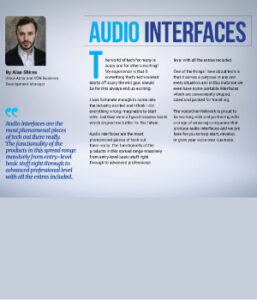
The coronavirus pandemic made voiceover home studios more common and acceptable, and despite in-house studios opening up again, I think much of the convenience of having a home studio to record from is still a popular option. During the pandemic, I helped hundreds of artists get set up with tailored setups ready to launch their businesses forward. Effectively all you need is a microphone, an audio interface, a pair of headphones, and a computer. The microphone is an electronic ear, though it is super sensitive and will hear so many sounds we might otherwise not hear. The audio interface takes the sound waves picked up by the microphone and converts them into something a computer can understand. On your computer, you will need to download what’s known as a ‘DAW.’ This is audio recording software. With that said, you are good to go!

Voiceover Equipment

Some equipment works better for some people than others. There are microphones for example, that complement higher-pitch voices and others that complement lower-pitch voices. Some variations in equipment don’t always work as well as others, but I will come on to that a little later. I wrote the intro to 4 equipment spreads in The Buzz magazine to give people a huge range of content, evaluating the pros and cons along with the prices and specs. Vocal booths, microphones, interfaces, and headphones are all things I looked at. A budget set up can be gained for around £200 to $250. This will give you a decent microphone, interface, and headphones to start you off. However, what type of microphone do you need, and where do you record?

Creating Your Space

There are several types of microphones out there, such as dynamic, large diaphragm, small diaphragm, and ribbon mics, to name a few. They all serve a purpose, but in voice over in particular, the typical standard is a large diaphragm condenser microphone. Most agents, casting directors, or clients will be expecting these types of microphones. It is key to make sure that you do not deviate from this as you want to make the experience as easy as possible to book work. There is, of course, the odd exception to the microphone large diaphragm condenser rule, but unless you are at a sound engineer level of experience, it is best to stick to what is normal in this instance.

Mixing Equipment and Elevating Your Performance

Several clients in the video game and anime genres prefer to work with Neumann TLM103s and U87s. A friend of mine said an Aston Spirit was a good substitute for the Neumann TLM103, so I decided to put this to the test. I compared several microphones to the TLM103, and ultimately the TLM103 outperformed in nearly every way, and some of the other microphones in the hustings proved to be better than the Aston Spirit. Amongst these microphones were the Rode NT1a, Imperative Audio Lucent, Vocaster, Aston Origin, Spirit and Stealth, and the Shure SM7b. I was in the process of upgrading from a Scarlette 2i2 to an Audient ID14 MKii.

These tests were conducted on the 2i2, but then I started to repeat the practise on the ID14. It was interesting that the Rode NT1a sounded amazing on the 2i2, yet on the ID14, it sounded ‘okay.’ Conversely, the TLM103 sounded great on the 2i2, yet on the ID14, it sounded exceptional! It does seem that the higher quality equipment does work better together. I can only assume a lower-budget interface with a higher-budget microphone does not pull through all the beauty the microphone is picking up.

Maximising Voiceover Home Studios

People often get concerned about where they are going to record. This can be due to external noise or rented accommodation. Sometimes it can be just down to space! But the good news is that there are plenty of options. Ideally, you want a reinforced acoustically treated soundproof workspace, but if that’s out of your budget or you do not have the price, do not worry. You can get portable vocal booths that fold up so that they can be stored away after use. The additional perk is that you can pack and put them in your car for traveling.

Portable booths range from tent-styled setups using blankets and sticks to rather heavy, thick, and dense materials. So, to summarise, there is the option of portable booths, which are lighter and thinner and offer more convenience, or a larger and heavier booth that sounds much better but is a bit more awkward to move about. Of course, there are products on the market, such as the Isocube and the Kaotica Eyeball, built to cover microphones, creating a decent size chamber that is not circulating the microphone.

Investing in Your Studio Brings Returns

Though the £200 to $250 bundles are incredible, for an extra £75 to $100, you can probably get something more tailored to your voice type and detailed needs. If you’re on the main road, in a terraced house, living with housemates and under a flight path, then you need to make sure you are doing things perfectly and waiting a couple of months to save up that extra couple of hundred pounds/dollars will be worth it in the long and short term. The good news is the home studio setup is always an evolving piece; even now, all these years in, I am still tweaking and changing my setup because it can always be better.

As I learn and technology evolves, I want to stay up to date with the latest tips, tricks, and trends, so I sound fantastic and competitive. Sometimes that super awesome sound might just be what gives you the edge. The good news is nothing is lost! If you upgrade, the old kit now happily resides in your travel kit bag or stands as an alternative should your client want to try a different sound or one of your components break. To close on that note, I always recommend two inputs rather than one for your audio interface because if one breaks, at least you have a second one to lean on.

Have fun building your studio. Make it personal to you; make it yours!

Filed Under: Home Studio, Press

Primary Sidebar

Categories

  • Animation
  • Anime
  • Commercial
  • Corporate
  • Home Studio
  • Interviews
  • Mocap
  • Narration
  • Personal Development
  • Press
  • Reviews
  • Video Games

Archives

©2026 Alan Shires // Voice Over Site by Voice Actor Websites
Website Hosting by UpperLevel Hosting

alan@alanshires.co.uk

MENU
  • Home
  • Voice Demos
    • Animation
    • Anime
    • Commercial
    • Narration
    • Video Games
    • Featured Work
  • Acting Demos
  • About
    • About
    • Resources
    • Testimonials
  • Clients
  • Media
    • Media
    • Press
    • Interviews
    • Reviews
  • Blog
  • Contact